Claude skill and Obsidian plugin to proofread your English writing
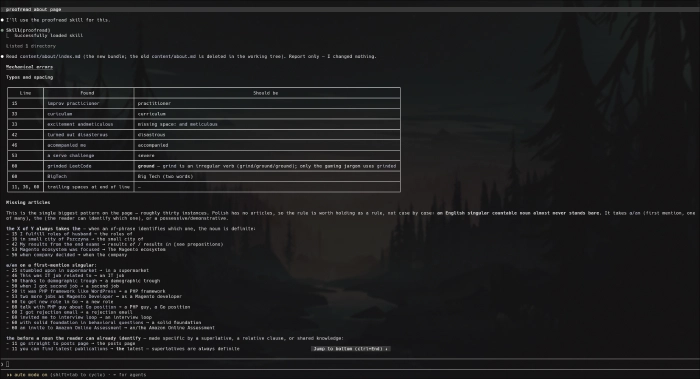
I created a proofreading skill for Claude Code to help me with English writing as a non-native speaker. This was initially a CC-only skill, but quickly enough, editing turned out tedious.
I iterated on it and made a complementary Obsidian plugin that renders skill findings in the Obsidian UI.
The skill classifies findings into four categories:
- Mechanical: grammar, typos, wrong articles, prepositions, commas, verb forms, double negatives, and more (sourced from D. Hacker’s “A Writer’s Reference” and J. Williams’s “Style: Lessons in Clarity and Grace”)
- Vocabulary: words you are talking around (sourced from D. Hacker’s “A Writer’s Reference”)
- Clutter: words to remove or replace (sourced from W. Zinsser’s “On Writing Well”)
- Clarity: weak endings, long openers, delayed subjects, missing words, misplaced modifiers, and more (sourced from D. Hacker and J. Williams)
How Does It Work? Copy link to this section
The Claude Code skill puts findings into the .proofread directory in the root of your Obsidian vault, as a JSON file. The plugin uses this file to highlight what you need to either fix or dismiss directly in the Obsidian UI.
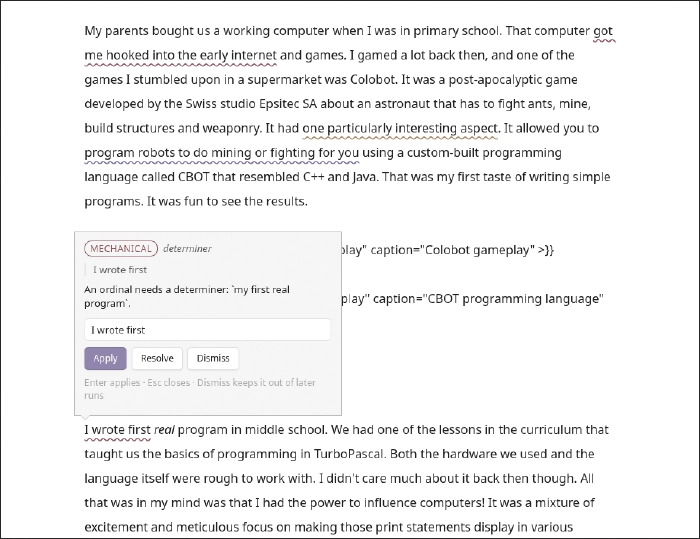
You can click on the finding to fix it in the modal window, or dismiss it if you believe it was marked as a false positive. Dismissed findings won’t reappear.
Who Is It For? Copy link to this section
For those who don’t delegate writing to AI and want to deliberately practice it instead. AI guides you, never writes a piece for you.
Installation Copy link to this section
Claude skill:
/plugin marketplace add codomaniac/skills
/plugin install proofread@codomaniac
Obsidian plugin: https://community.obsidian.md/plugins/proofread
How to work with it Copy link to this section
- Install both the plugin and the skill
- Open your vault in Obsidian
- Enable the
Proofreadplugin - Open your vault in Claude
- Open a file you want to proofread in Obsidian
- Tell Claude to use the
proofreadskill on the file - Wait for Claude to finish its analysis
- Fix/dismiss findings in Obsidian
- Repeat steps 6 - 8 until you are satisfied with the results